YOUR AI COPILOT THAT EXECUTES, NOT JUST CHATS
Ask AI is an internal, user-facing AI assistant built directly into your CRM. Unlike generic chatbots that just answer questions, Ask AI is an execution engine — use natural language prompts to command it to perform actual tasks, build workflows, and analyze data within your account.
Try a prompt
One Copilot · Every CRM Task
BUILD ANYTHING WITH WESTCOAST AI
Web apps, mobile apps, websites, AI agents, dashboards, and more — all from a single all-in-one platform.
EVERYTHING ASK AI EXECUTES
Instead of just sending static auto-replies, Ask AI acts as an execution engine. You command it in natural language and it performs actual tasks, builds workflows, and analyzes data inside your account.
CRM & Data Management
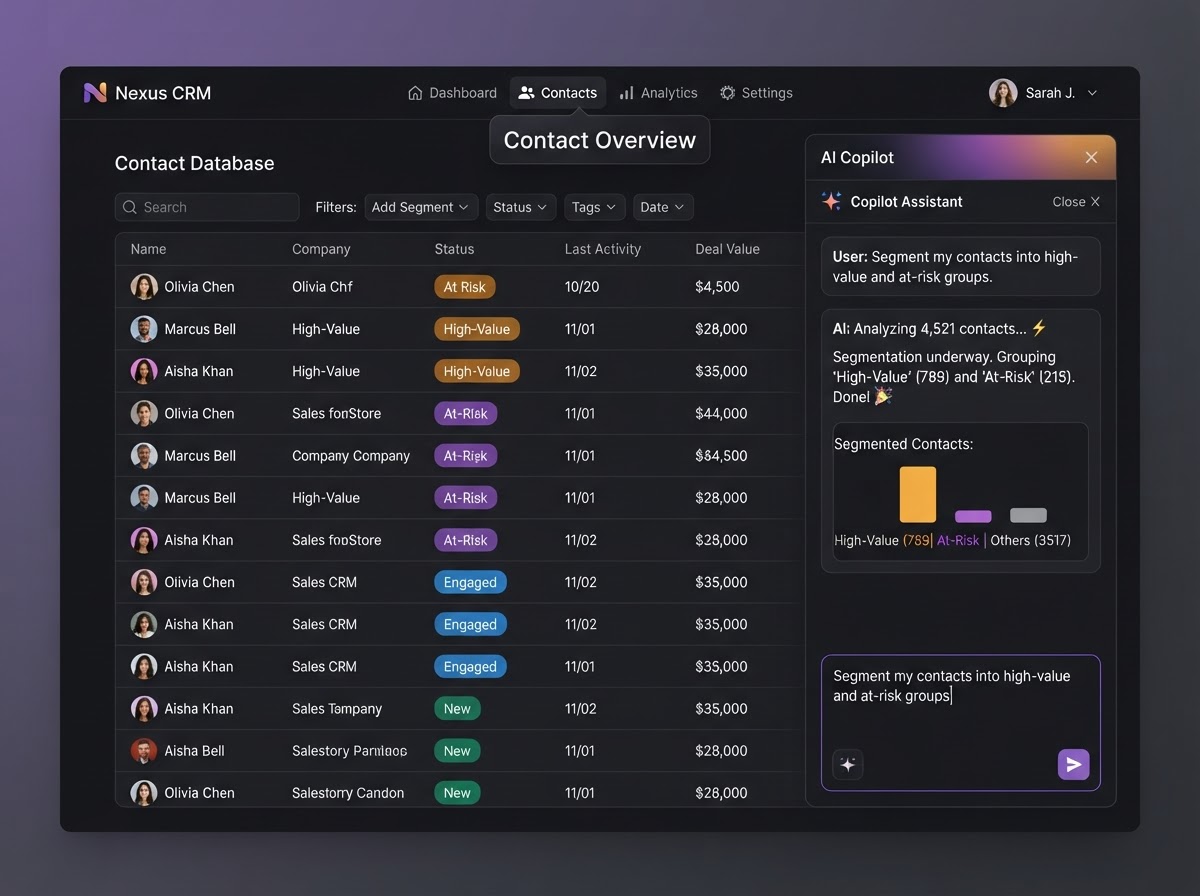
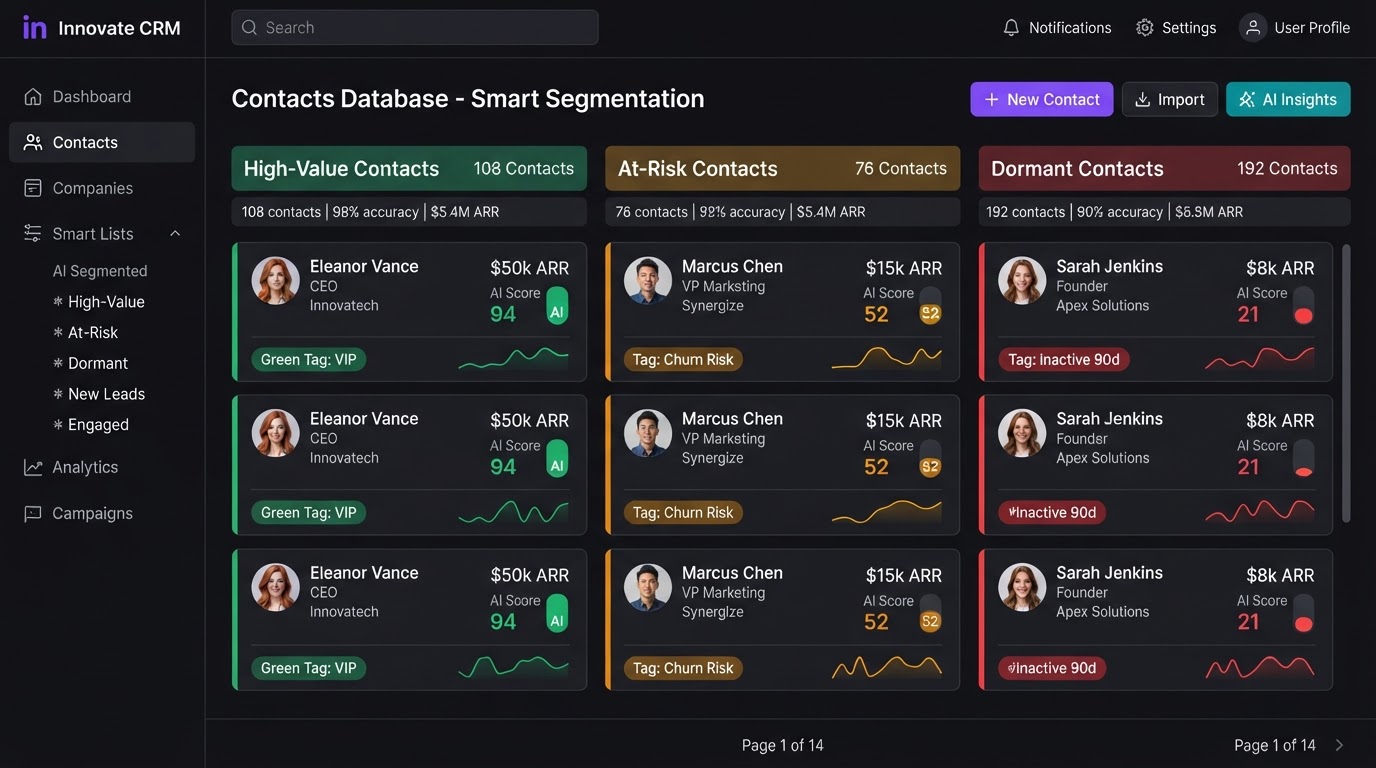
Instruct the AI to read, update, or organize your database. Prompt it to 'segment my contacts into high-value and at-risk groups' or 'find all stalled opportunities in my pipeline,' and it executes the action — no manual filtering required.
Content & Campaign Creation
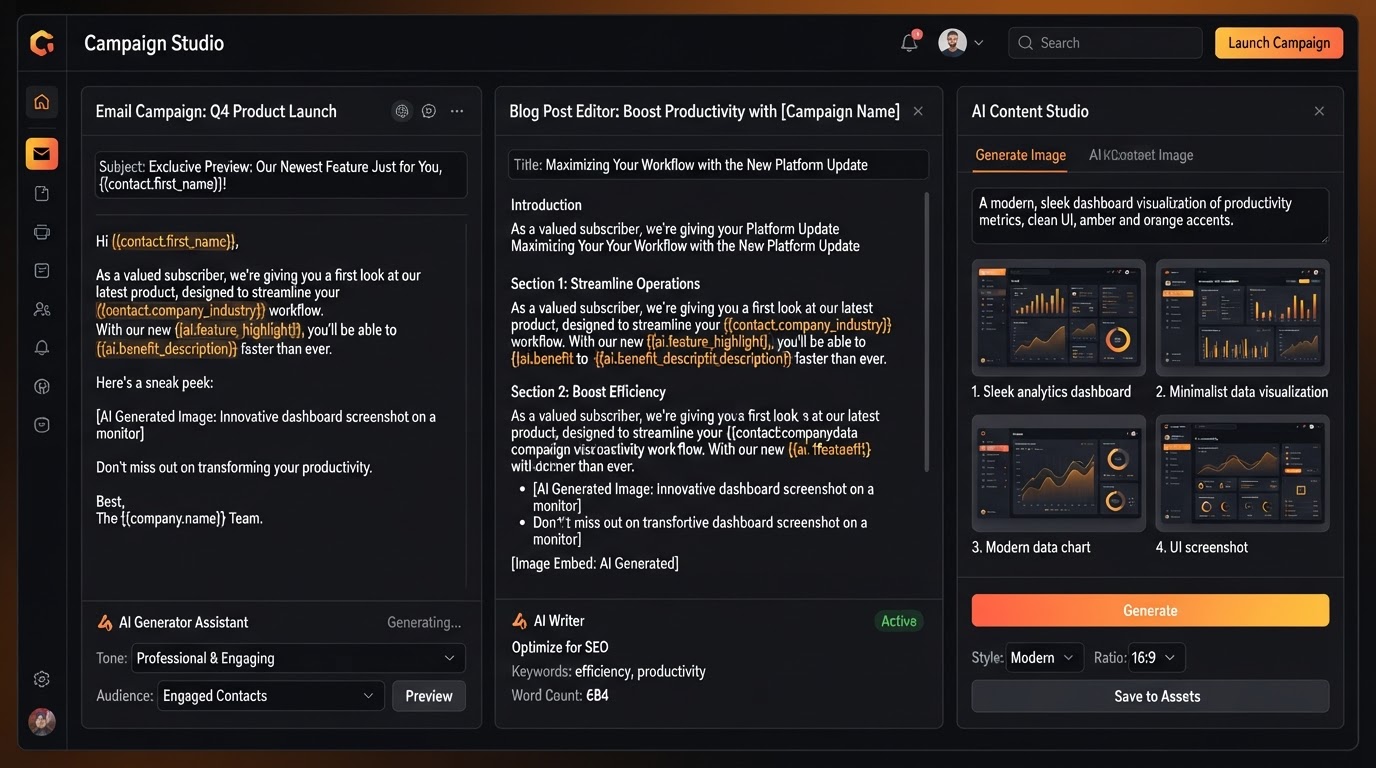
Draft personalized email templates, write and format blog posts, generate AI images for marketing, and execute bulk SMS or email campaigns to specific contact lists — all from a single natural language prompt.
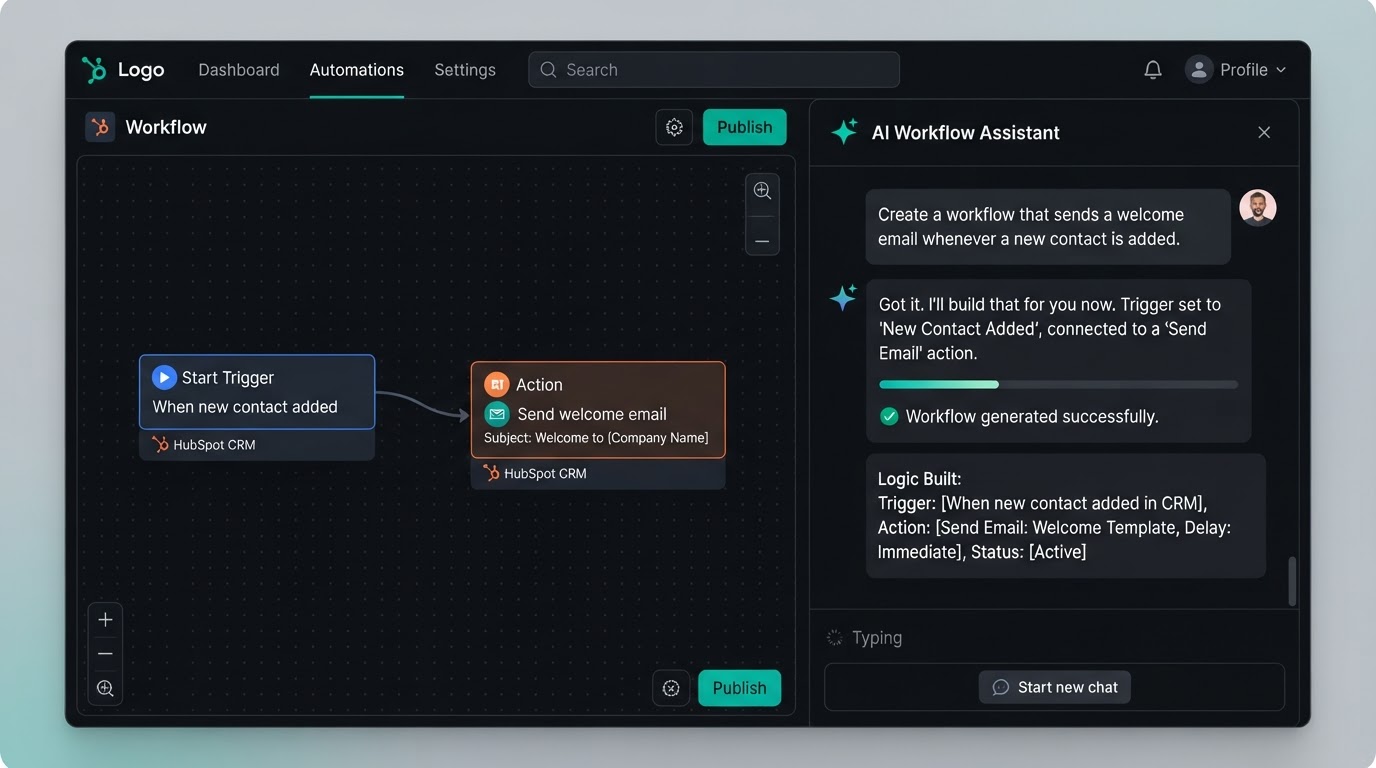
Event-Based Automation (Triggers)
Build custom automation 'Skills' conversationally. Type 'Create a skill that sends a welcome email when a new contact is added,' and Ask AI automatically configures the event trigger and builds the underlying workflow logic — no manual mapping.
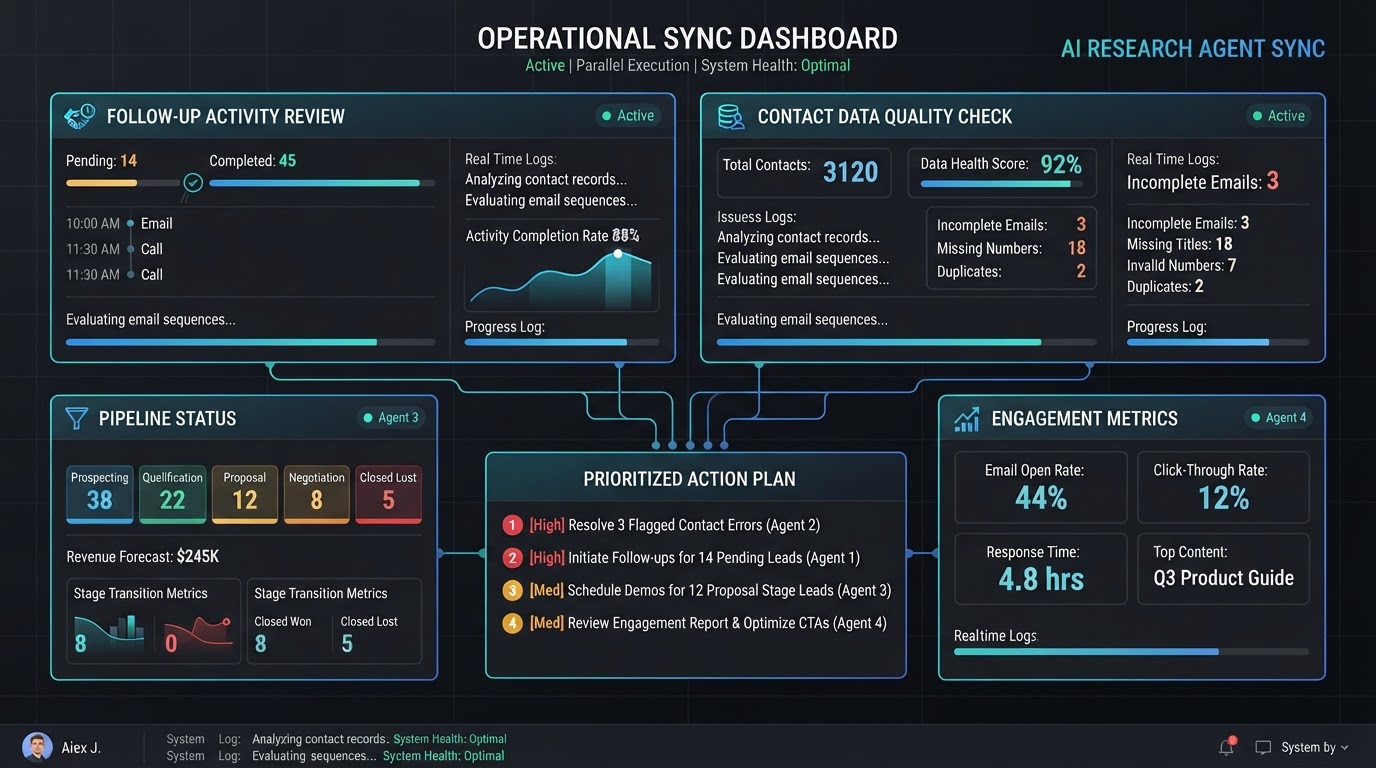
Parallel Research for Complex Tasks
Give Ask AI a complex, multi-step prompt and it splits the workload. Deploy up to four research agents simultaneously — reviewing follow-up activity while checking contact data quality — then combine their findings into a single prioritized action plan.
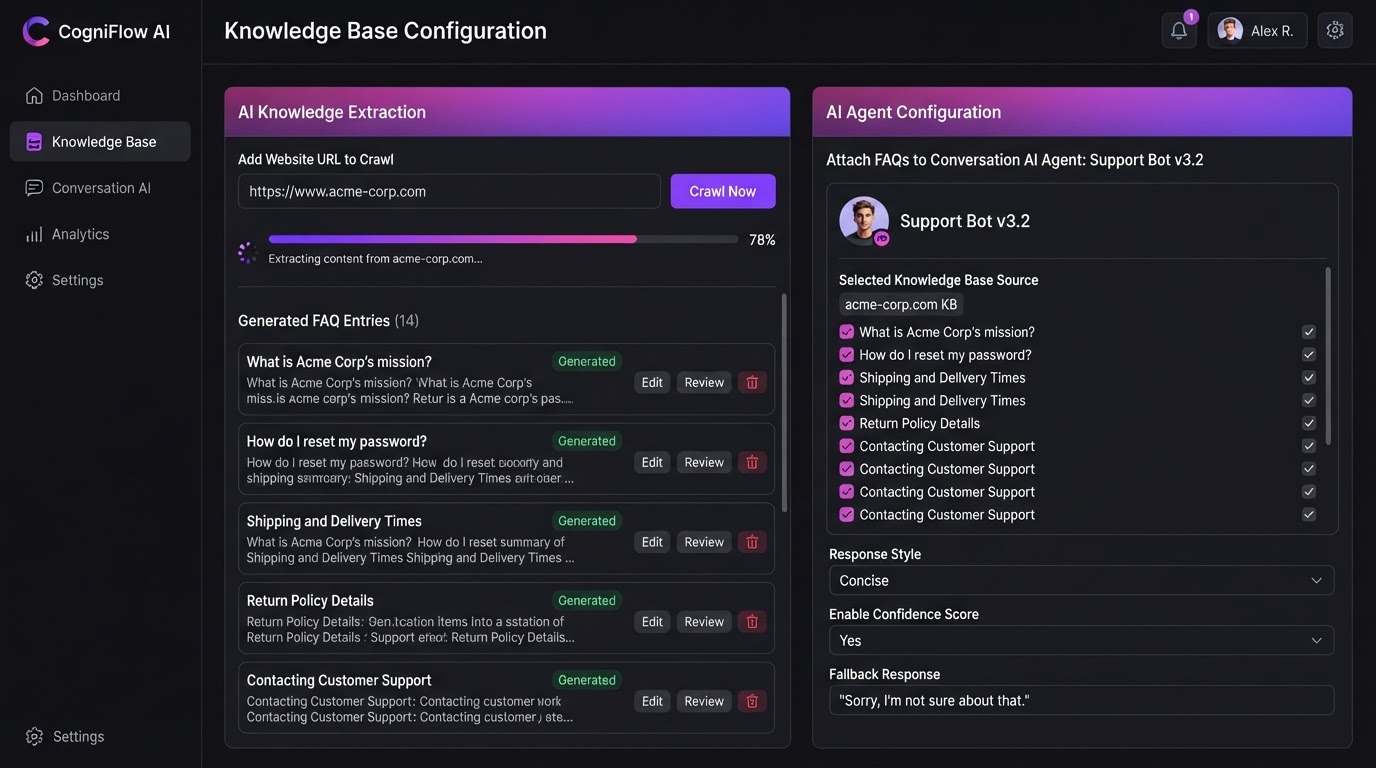
Knowledge Base Setup
Point Ask AI at your website URL and it automatically crawls the site, extracts the information, generates a list of FAQs, and attaches the data to your Conversation AI or Voice AI agents — ready to answer customer questions instantly.
Your Internal AI Copilot
Unlike customer-facing agents that talk to your leads, Ask AI is strictly for you and your team. It helps you manage your business, execute tasks inside your account, and even build and configure the customer-facing bots that power your outreach.
FROM PROMPT TO EXECUTION
Ask AI doesn't just answer questions — it acts. Type what you want done in natural language, and the copilot reads your database, builds the logic, and makes it happen inside your CRM.
Type It. It Does It.
From Natural Language To Executed Action
Ask AI isn't a chatbot that just answers questions — it's an execution engine. You use natural language to command it to perform actual tasks inside your account. Tell it what you want, and it reads your database, builds the logic, and makes it happen.
- Natural language prompts replace clicks and manual configuration
- Segment contacts, find stalled deals, and organize pipelines instantly
- Draft campaigns, write content, and launch bulk sends from one prompt
- Build automation Skills conversationally — no workflow mapping required
Four Agents, One Answer
Parallel Research For Complex Tasks
When you give Ask AI a complex, multi-step prompt, it doesn't just work sequentially — it splits the workload. Up to four research agents deploy simultaneously, each handling a different part of the request, and their findings combine into a single, prioritized action plan.
- Deploy up to 4 parallel research agents on a single prompt
- Review follow-up activity while checking contact data quality simultaneously
- Combine findings into one prioritized, actionable plan
- Turn multi-step research into a single natural language request
Auto-Build Your Bot's Brain
Crawl, Extract, Generate & Attach — Automatically
Point Ask AI at your website URL and it does the rest. It crawls the site, extracts the relevant information, generates a structured list of FAQs, and attaches that knowledge to your Conversation AI or Voice AI agents — giving them everything they need to answer customer questions without manual training.
- Crawl any website URL and extract content automatically
- Generate a structured FAQ list from extracted information
- Attach the knowledge base to Conversation AI & Voice AI agents
- No manual copy-paste — your bots get smart in minutes
TRY THESE ASK AI PROMPTS
Ask AI understands plain English. Click any sample to see the prompt and the action it executes — then copy it and try it in your own account.
Your Prompt
"Segment my contacts into high-value and at-risk groups based on their last activity and deal value."
Ask AI Executes
Done — 247 high-value, 83 at-risk contacts tagged and ready for targeted outreach.
Just type what you want done — Ask AI reads your data and executes the action.
ASK AI BUILT FOR EVERY TEAM
Real-world scenarios where Ask AI turns a natural language prompt into a fully executed task — segmenting contacts, auditing pipelines, and auto-building knowledge bases for your customer-facing bots.
Segment & Launch in One Prompt
An agency owner types 'segment my contacts into high-value and at-risk groups, then send a re-engagement email to the at-risk segment.' Ask AI segments the database, drafts the email, and launches the campaign — all from a single prompt, no manual filtering or template building.
Parallel Research for Pipeline Audit
A SaaS sales manager asks Ask AI to audit their pipeline. Four parallel agents deploy — one reviews follow-up activity, one checks contact data quality, one analyzes deal values, one flags stalled opportunities — and combine into a prioritized action plan the manager can execute immediately.
Auto-Build a Customer Support Bot Brain
An e-commerce brand points Ask AI at their help center URL. The AI crawls the site, extracts return policies and shipping FAQs, generates a structured knowledge base, and attaches it to their Conversation AI chat widget — turning a chatbot into a self-service support agent in minutes.
Replace all your AI tools with one copilot
Stop paying for separate AI assistants, workflow builders, and research agents. Ask AI consolidates your entire AI copilot stack — native inside your CRM.
Pick the software you're paying for today. We'll estimate your current monthly cost and show how Westcoast AI replaces it all — CRM, AI, and automation — with a plan sized for your team.
Select your current tools
0 selected · 302 platformsWestcoast AI
1 unified platform
CRM + AI + Automations included
Your Stack (est.)
$0/mo
0 tools
Est. Savings
$0/mo
$0/yr
Select the platforms you use today to see a feature-by-feature comparison with Westcoast AI.
MONTHLY PLANS
PRICING THAT FITS YOUR NEEDS AND BUDGET WITH ALL THE AUTOMATED AI INCLUDED
STARTER
- Basic
- 7-day free trial
- No setup fees
- 1 user
- AI & Automation
- AI Studio Web Builder
- Funnel Builder
- AI Voice Agent
- Text Message Conversation AI
- Creator Studio
- Mobile App Builder
- Basic AI Agents
- CRM
- Unlimited Contacts
- Opportunities & Pipeline Tracking
- Tasks
- Booking Calendars
- Marketing
- Social Media Planner & Automation
- Mass Email Campaigns
- Review & Reputation Management
- Social Media Ad Manager
- Affiliate Marketing Manager
GROWTH
- Basic
- 7-day free trial
- 20% off any advanced monthly AI services or lead generation
- No setup fees
- 3 users
- Snapshot Image For Your Industry Enabled
- AI & Automation
- AI Studio Web Builder
- Funnel Builder
- AI Voice Agent
- Text Message Conversation AI
- Creator Studio
- Mobile App Builder
- Auto Snapshot For Any Industry
- CRM
- Unlimited Contacts
- Opportunities & Pipeline Tracking
- Tasks
- Booking Calendars
- Unified Inbox (Email, SMS, Socials)
- Marketing
- Social Media Planner & Automation
- Mass Email Campaigns
- Review & Reputation Management
- Social Media Ad Manager
- Affiliate Marketing Manager
PREMIUM
- Basic
- 7-day free trial
- 30% off any advanced monthly AI services or lead generation
- No setup fees
- 10 users
- White-glove done-for-you custom setup
- API & Webhook Access
- AI & Automation
- AI Studio Web Builder
- Funnel Builder
- AI Voice Agent
- Text Message Conversation AI
- Creator Studio
- Mobile App Builder
- Auto Snapshot For Any Industry
- White-glove AI bot setup for voice and conversation done for you
- CRM
- Unlimited Contacts
- Opportunities & Pipeline Tracking
- Tasks
- Booking Calendars
- Unified Inbox (Email, SMS, Socials)
- Marketing
- Social Media Planner & Automation
- Mass Email Campaigns
- Review & Reputation Management
- Social Media Ad Manager
- Affiliate Marketing Manager
ENTERPRISE
- Basic
- No setup fees
- 40% off AI Leads and services
- 11 or more users
- White-glove done-for-you custom setup
- API & Webhook Access
- All Enterprise and custom solutions
- AI & Automation
- AI Studio Web Builder
- Funnel Builder
- AI Voice Agent
- Text Message Conversation AI
- Creator Studio
- Mobile App Builder
- Auto Snapshot For Any Industry
- White-glove AI bot setup for voice and conversation done for you
- CRM
- Unlimited Contacts
- Opportunities & Pipeline Tracking
- Tasks
- Booking Calendars
- Unified Inbox (Email, SMS, Socials)
- Marketing
- Social Media Planner & Automation
- Mass Email Campaigns
- Review & Reputation Management
- Social Media Ad Manager
- Affiliate Marketing Manager
ASK AI QUESTIONS
Ask AI is an internal, user-facing AI assistant (an AI Copilot) built directly into the CRM dashboard. Unlike generic chatbots that simply answer questions, Ask AI acts as an execution engine — you use natural language prompts to command it to perform actual tasks, build workflows, or analyze data within your account.
Conversation AI and Voice AI are customer-facing agents that talk to your leads and customers. Ask AI is strictly for you and your team — it helps you manage your business, execute tasks inside your CRM, and can even be used to build and configure those customer-facing bots.
Yes. You can instruct the AI to read, update, or organize your database. For example, prompt it to 'segment my contacts into high-value and at-risk groups' or 'find all stalled opportunities in my pipeline,' and it will execute the action directly within your account.
If you give Ask AI a complex, multi-step prompt, it can split the workload by deploying up to four research agents simultaneously. Each agent handles a different part of the request — such as reviewing follow-up activity while checking contact data quality — and their findings are combined into a single, prioritized action plan.
Yes. You can use Ask AI to build custom automation 'Skills' conversationally. Type 'Create a skill that sends a welcome email when a new contact is added,' and the AI automatically configures the event trigger and builds the underlying workflow logic without requiring you to manually map out a workflow.
You can prompt Ask AI to build a Knowledge Base for your customer-facing bots. By pointing it to your website URL, Ask AI automatically crawls the site, extracts the information, generates a list of FAQs, and attaches the data to your Conversation AI or Voice AI agents — no manual training required.
See your business built in minutes.
Book a live walkthrough of the Westcoast AI Studio. Tell us what you sell and watch us generate a complete, niche-matched website on the spot — copy, imagery, layout, and CRM integration included.

Book your demo
Tell us about your project — we'll build it live.