EVERY LEAD, PROSPECT & CUSTOMER IN ONE LIVING DATABASE
Contacts form the foundational database of the CRM — the central hub where every lead, prospect, and customer is stored. It acts as the operational anchor for all marketing, sales, and communication efforts, with a complete unified profile for every person who ever interacts with your business.
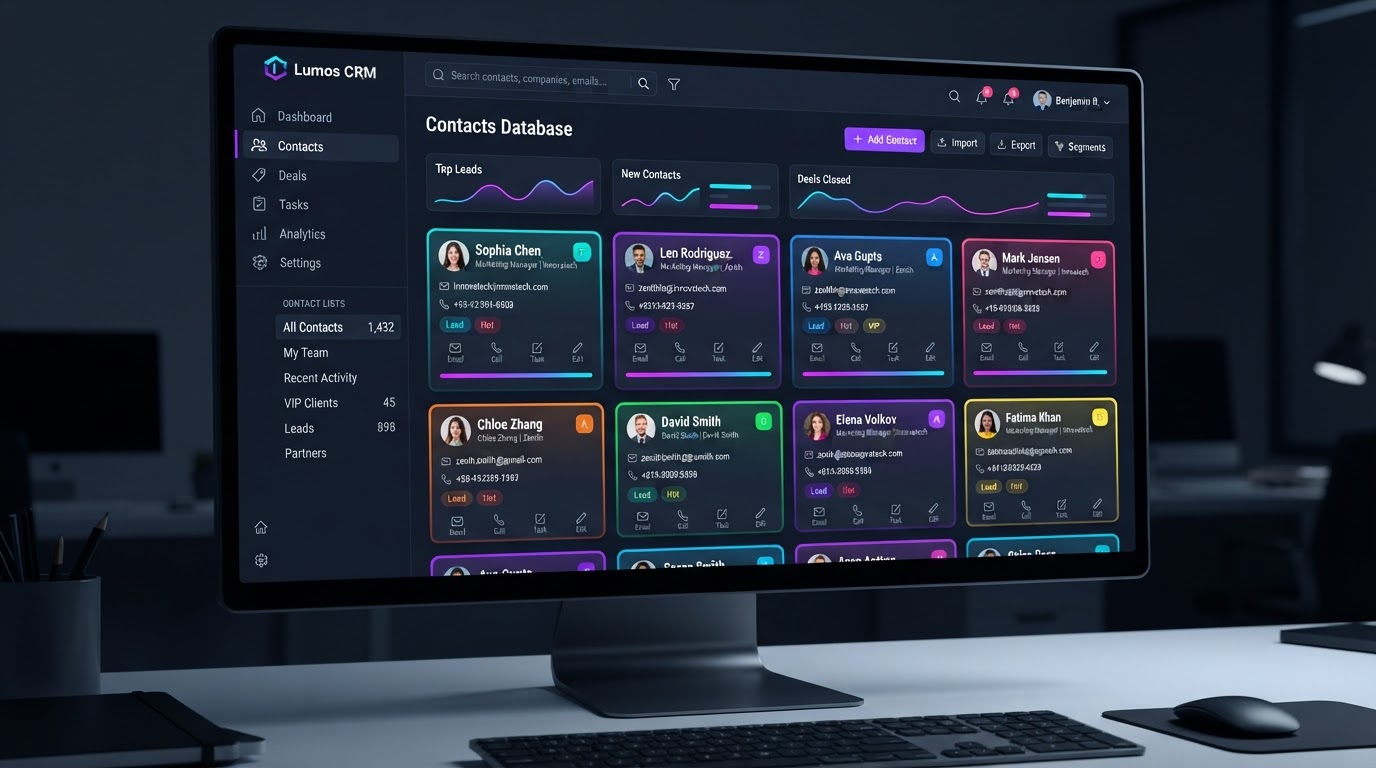
The Operational Backbone For Your Entire Business
BUILD ANYTHING WITH WESTCOAST AI
Web apps, mobile apps, websites, AI agents, dashboards, and more — all from a single all-in-one platform.
EVERY INTERACTION IN ONE PROFILE
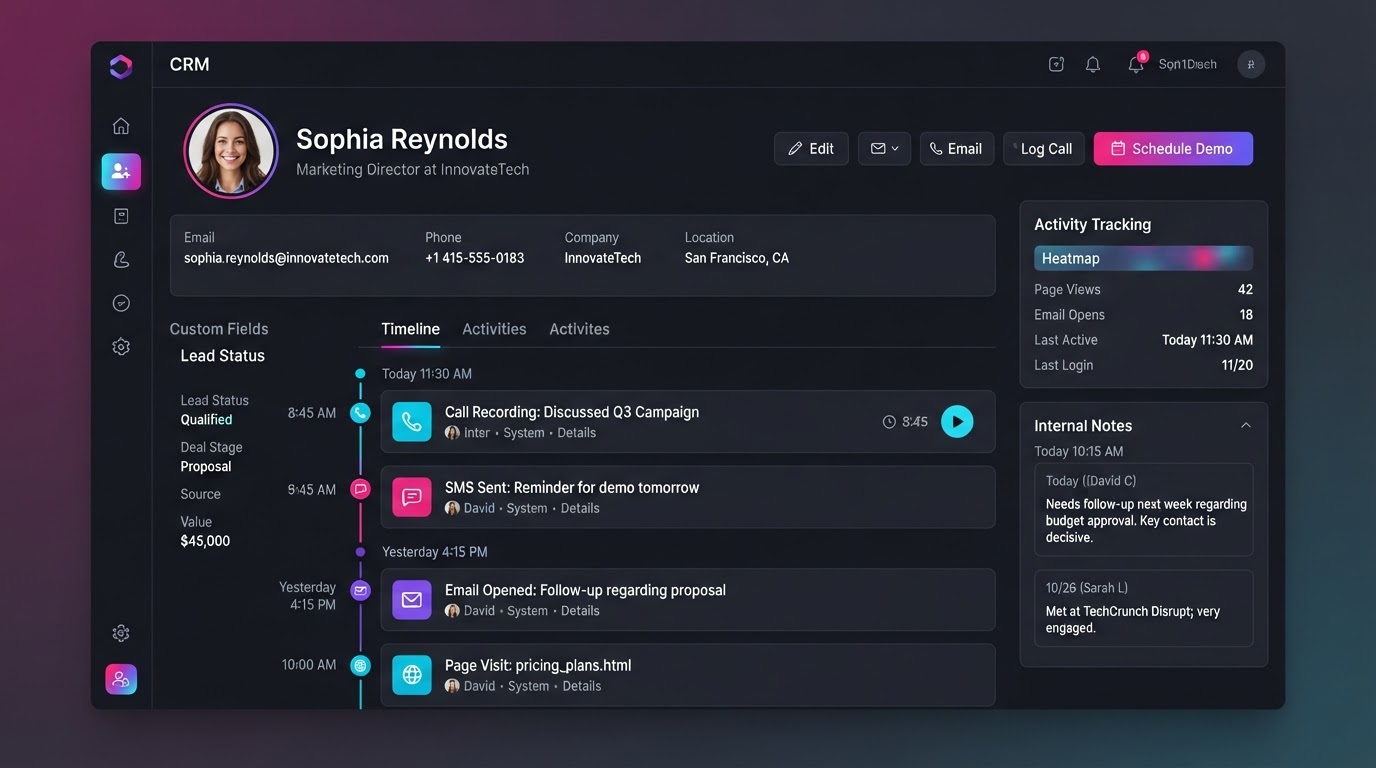
When you click on a contact, you get their entire history with your business — core details, every conversation, every page they visited, and every internal note your team has left. No more digging through tabs.
ProfileCore Details & Custom Fields
Standard information like name, phone number, and email, alongside custom fields that capture specific data pulled from your website forms or surveys — so every detail a lead shares lives right on their record.
 Inbox
Centralized Communication
A unified chronological feed of every interaction you have had with the contact — emails, SMS messages, phone call recordings, and social media DMs — all in one timeline, never scattered across tabs.
 Tracking
Activity Tracking
A log of the contact's behavior — which of your website pages they have visited, which emails they have opened, and what links they have clicked — giving you full visibility into their journey without guessing.
 Tools
Internal Tools & Notes
Sections for your team to leave internal notes, assign follow-up tasks, attach documents like invoices or contracts, and manage appointments — keeping the whole team aligned on every contact.
FROM RAW LEAD TO CLOSED CUSTOMER
Contacts are the operational anchor for everything — a unified profile, powerful organization tools, and deep automation that moves contacts through your pipeline on their own.
The Unified Contact Record
Your Entire History With Every Contact In One Place
When you click on an individual contact, you are taken to their specific Contact Record, which aggregates their entire history with your business. Core details, every conversation, every page visit, and every internal note — all in one profile.
- Core details, custom fields, and form data captured automatically
- Chronological feed of emails, SMS, call recordings, and social DMs
- Activity log of page visits, email opens, and link clicks
- Internal notes, tasks, documents, and appointments for your team
Organization & Segmentation
Keep Large Databases Clutter-Free & Searchable
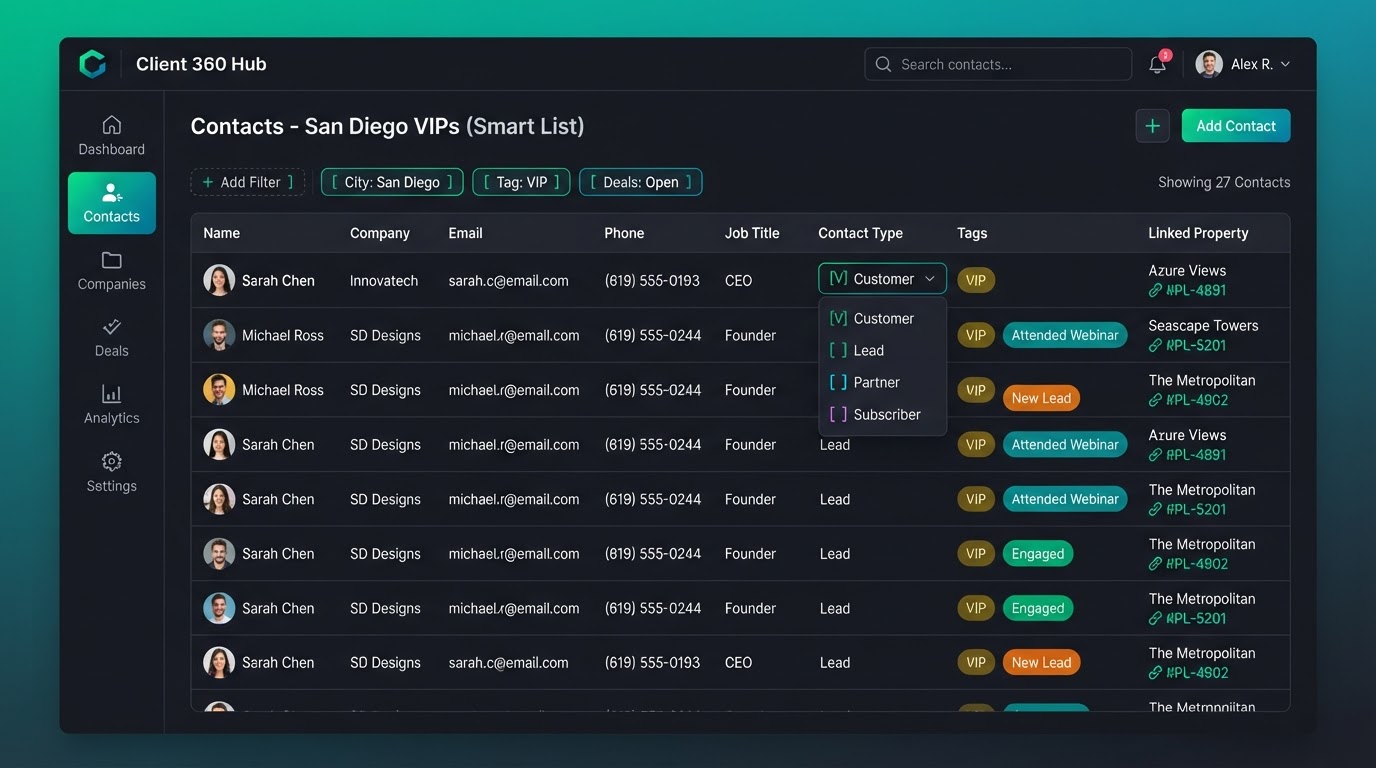
Contacts provides several ways to organize large databases to prevent clutter — from broad Contact Types to flexible Tags, dynamically updating Smart Lists, and relational Custom Objects that link assets directly to a contact's profile.
- Contact Types: broad, mutually exclusive classifications (Lead, Customer, Partner)
- Tags: dynamic, flexible labels for detailed multi-tag segmentation
- Smart Lists: saved, dynamically updating filtered views for targeted blasts
- Custom Objects: relational databases linking properties or vehicles to contacts
Automation & Pipeline Integration
Contacts That Move Themselves Through Your Funnel
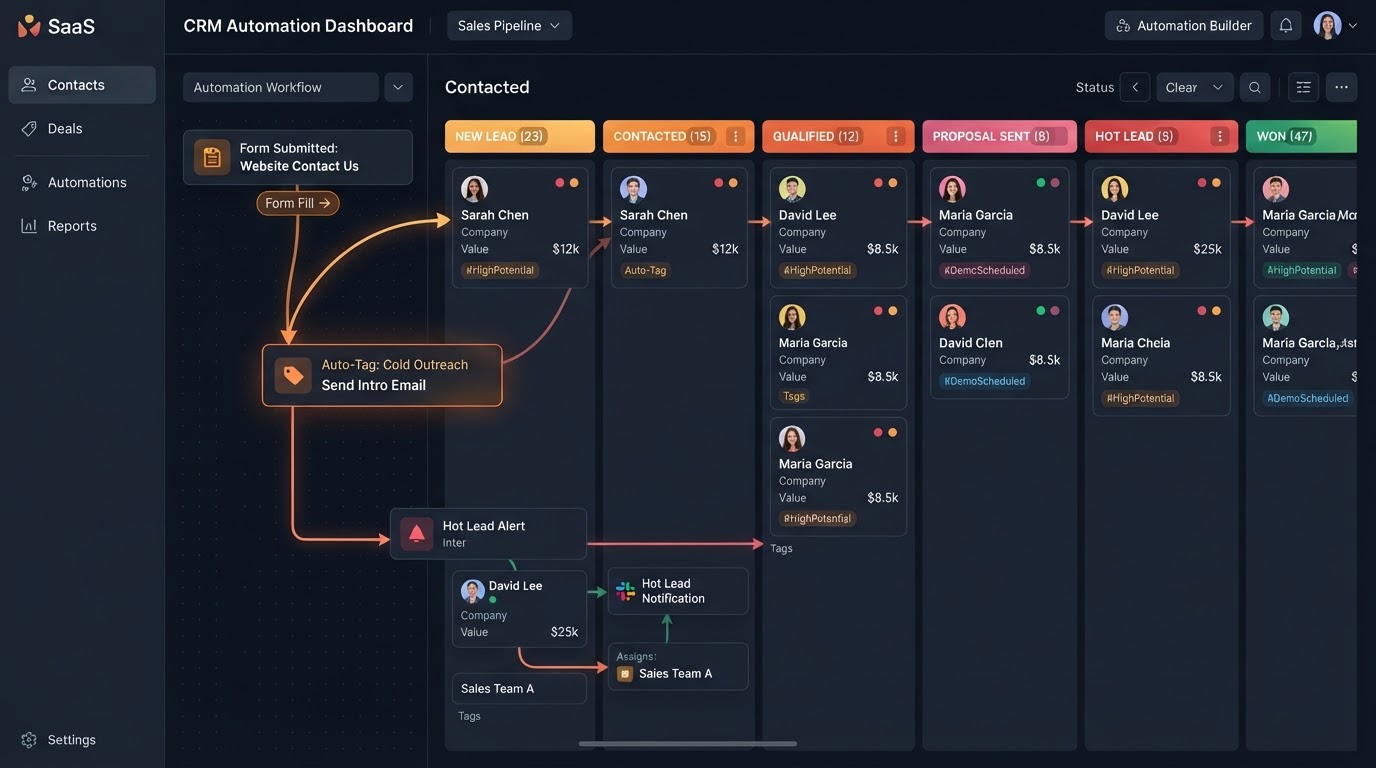
Contacts are rarely static — they are deeply integrated with the platform's automation engine (Workflows) and sales tracking (Pipelines). When a new lead fills out a form, the system automatically creates a contact and, based on their actions, updates their tags, Contact Type, or pipeline stage.
- New form submissions automatically create a new contact instantly
- Workflows auto-add tags based on a lead's replies and actions
- Contact Type and pipeline stage update automatically as leads progress
- Replying to a text or booking a call moves their card to the next stage
CONTACTS IN EVERY INDUSTRY
Real-world scenarios where Contacts' unified records, smart segmentation, and automated pipeline routing keep every business organized and moving — from real estate to e-commerce.
Properties Linked To Every Buyer & Seller
A real estate agency creates a "Property" Custom Object and links each listing directly to the buyer and seller contacts involved. Every showing, offer, and conversation lives on one record — so no agent ever has to dig through email threads to find the history on a deal.
Vehicles Tied To Every Customer Profile
A car dealership builds a "Vehicle" Custom Object and links each car to the customer who inquired, test-drove, or purchased it. Service history, trade-in details, and follow-up tasks all stay on the contact's record — so the sales team knows exactly where every buyer stands.
Patient Records, Notes & Appointments In One Profile
A clinic stores every patient as a contact with custom fields for insurance, referral source, and treatment notes. Internal tools let the front desk assign follow-up tasks, attach intake documents, and manage appointments — all visible to every team member on the same record.
Smart Lists Power Targeted Client Campaigns
An agency tags every contact by service tier — "VIP," "Retainer," "Pilot" — and builds Smart Lists that auto-update as clients upgrade or downgrade. When it's time to send a quarterly check-in email, they filter to exactly the right segment and blast in one click.
Pipeline Cards That Move Themselves
A contractor's new website form submission auto-creates a contact, tags it "New Estimate," and drops it on the "New Lead" pipeline stage. When the homeowner replies to the follow-up text, the workflow moves their card to "Contacted" and assigns a rep to call — without anyone lifting a finger.
Activity Tracking Reveals What Shoppers Want
An e-commerce brand watches each contact's activity feed — which product pages they visited, which emails they opened, which links they clicked — and uses those signals to tag shoppers as "High Intent" so the team can follow up with the right offer at the right moment.
Replace all your contact tools with one platform
Stop paying for separate contact managers, CRM databases, and pipeline trackers. Westcoast Contacts consolidates your entire contact stack — native inside your CRM.
Pick the software you're paying for today. We'll estimate your current monthly cost and show how Westcoast AI replaces it all — CRM, AI, and automation — with a plan sized for your team.
Select your current tools
0 selected · 302 platformsWestcoast AI
1 unified platform
CRM + AI + Automations included
Your Stack (est.)
$0/mo
0 tools
Est. Savings
$0/mo
$0/yr
Select the platforms you use today to see a feature-by-feature comparison with Westcoast AI.
MONTHLY PLANS
PRICING THAT FITS YOUR NEEDS AND BUDGET WITH ALL THE AUTOMATED AI INCLUDED
STARTER
- Basic
- 7-day free trial
- No setup fees
- 1 user
- AI & Automation
- AI Studio Web Builder
- Funnel Builder
- AI Voice Agent
- Text Message Conversation AI
- Creator Studio
- Mobile App Builder
- Basic AI Agents
- CRM
- Unlimited Contacts
- Opportunities & Pipeline Tracking
- Tasks
- Booking Calendars
- Marketing
- Social Media Planner & Automation
- Mass Email Campaigns
- Review & Reputation Management
- Social Media Ad Manager
- Affiliate Marketing Manager
GROWTH
- Basic
- 7-day free trial
- 20% off any advanced monthly AI services or lead generation
- No setup fees
- 3 users
- Snapshot Image For Your Industry Enabled
- AI & Automation
- AI Studio Web Builder
- Funnel Builder
- AI Voice Agent
- Text Message Conversation AI
- Creator Studio
- Mobile App Builder
- Auto Snapshot For Any Industry
- CRM
- Unlimited Contacts
- Opportunities & Pipeline Tracking
- Tasks
- Booking Calendars
- Unified Inbox (Email, SMS, Socials)
- Marketing
- Social Media Planner & Automation
- Mass Email Campaigns
- Review & Reputation Management
- Social Media Ad Manager
- Affiliate Marketing Manager
PREMIUM
- Basic
- 7-day free trial
- 30% off any advanced monthly AI services or lead generation
- No setup fees
- 10 users
- White-glove done-for-you custom setup
- API & Webhook Access
- AI & Automation
- AI Studio Web Builder
- Funnel Builder
- AI Voice Agent
- Text Message Conversation AI
- Creator Studio
- Mobile App Builder
- Auto Snapshot For Any Industry
- White-glove AI bot setup for voice and conversation done for you
- CRM
- Unlimited Contacts
- Opportunities & Pipeline Tracking
- Tasks
- Booking Calendars
- Unified Inbox (Email, SMS, Socials)
- Marketing
- Social Media Planner & Automation
- Mass Email Campaigns
- Review & Reputation Management
- Social Media Ad Manager
- Affiliate Marketing Manager
ENTERPRISE
- Basic
- No setup fees
- 40% off AI Leads and services
- 11 or more users
- White-glove done-for-you custom setup
- API & Webhook Access
- All Enterprise and custom solutions
- AI & Automation
- AI Studio Web Builder
- Funnel Builder
- AI Voice Agent
- Text Message Conversation AI
- Creator Studio
- Mobile App Builder
- Auto Snapshot For Any Industry
- White-glove AI bot setup for voice and conversation done for you
- CRM
- Unlimited Contacts
- Opportunities & Pipeline Tracking
- Tasks
- Booking Calendars
- Unified Inbox (Email, SMS, Socials)
- Marketing
- Social Media Planner & Automation
- Mass Email Campaigns
- Review & Reputation Management
- Social Media Ad Manager
- Affiliate Marketing Manager
CONTACTS QUESTIONS
Contacts form the foundational database of the CRM. The Contacts tab is the central hub where every lead, prospect, and customer is stored — acting as the operational anchor for all marketing, sales, and communication efforts across the entire platform.
When you click on an individual contact, you are taken to their specific Contact Record, which aggregates their entire history with your business — core details and custom fields, a chronological feed of every interaction, activity tracking, and internal tools for notes, tasks, documents, and appointments.
Contact Types are broad, mutually exclusive classifications — a contact can only have one at a time (e.g., Lead, Customer, or Partner). Tags are dynamic, flexible labels for detailed segmentation — a contact can have multiple tags simultaneously (e.g., VIP, Attended May Webinar, Purchased Core Offer).
Smart Lists are saved, dynamically updating filtered views. For example, you can create a Smart List that automatically displays all contacts who are Customers in San Diego with the VIP tag — making it easy to send highly targeted bulk emails or SMS blasts without manual filtering every time.
Custom Objects let you build relational databases inside the CRM. If you run a real estate agency or car dealership, you can create a Property or Vehicle object and link those specific, separate assets directly to a contact's profile — so every related record is connected.
When a new lead fills out a form, the system automatically creates a new contact. Based on their actions — like replying to a text or booking a call — workflows can automatically add tags, update their Contact Type, or move their contact card to a new stage in your sales pipeline. Contacts are rarely static.
See your business built in minutes.
Book a live walkthrough of the Westcoast AI Studio. Tell us what you sell and watch us generate a complete, niche-matched website on the spot — copy, imagery, layout, and CRM integration included.

Book your demo
Tell us about your project — we'll build it live.