
CAPTURE EVERY LEAD INTO YOUR CRM
Native lead-capture and data-collection forms built directly into your CRM — replacing Jotform, Typeform, and Gravity Forms. Every submission flows instantly into your contact database and automation engine. No Zapier, no external bridging, no extra subscription.
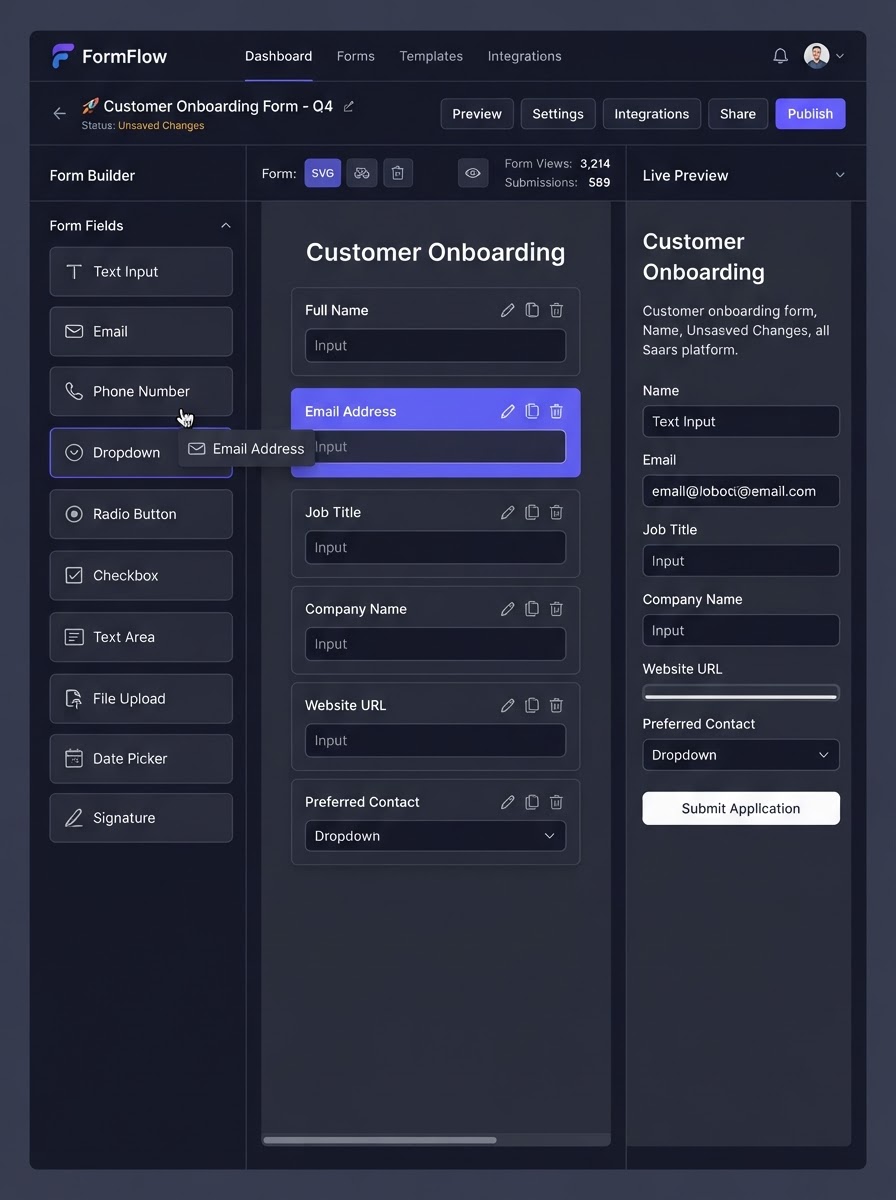
Your Native Form Builder — Replacing Jotform, Typeform & Gravity Forms
BUILD ANYTHING WITH WESTCOAST AI
Web apps, mobile apps, websites, AI agents, dashboards, and more — all from a single all-in-one platform.
EVERYTHING POWERING YOUR FORMS
Six core capabilities that turn a simple form into a complete, CRM-connected lead-capture engine — all native inside your platform, no extra subscription required.
BuilderDrag-and-Drop Builder
Visually build forms using standard fields — Name, Email, Phone — and custom fields tailored to your specific business needs, including dropdowns, file uploads, and e-signatures. Arrange fields in a single column, side-by-side, or a streamlined horizontal single-line design.
 Logic
Multi-Step & Conditional Logic
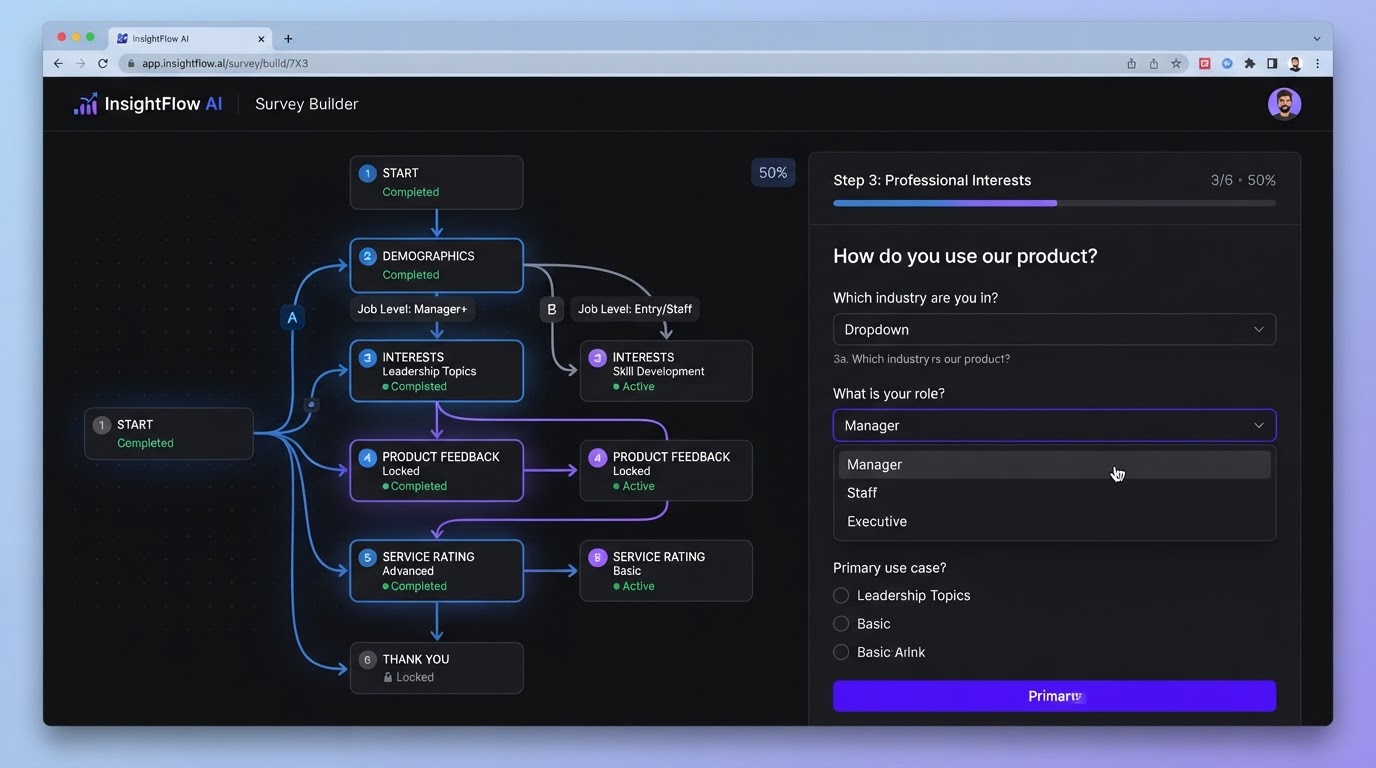
Break questions into a multi-step survey instead of overwhelming prospects with a massive single-page form. Apply conditional logic to show or hide specific fields — or entirely different branching paths — based on how a user answered a previous question. Highly effective for pre-qualifying leads before they can book an appointment.
 Sticky
 Contacts
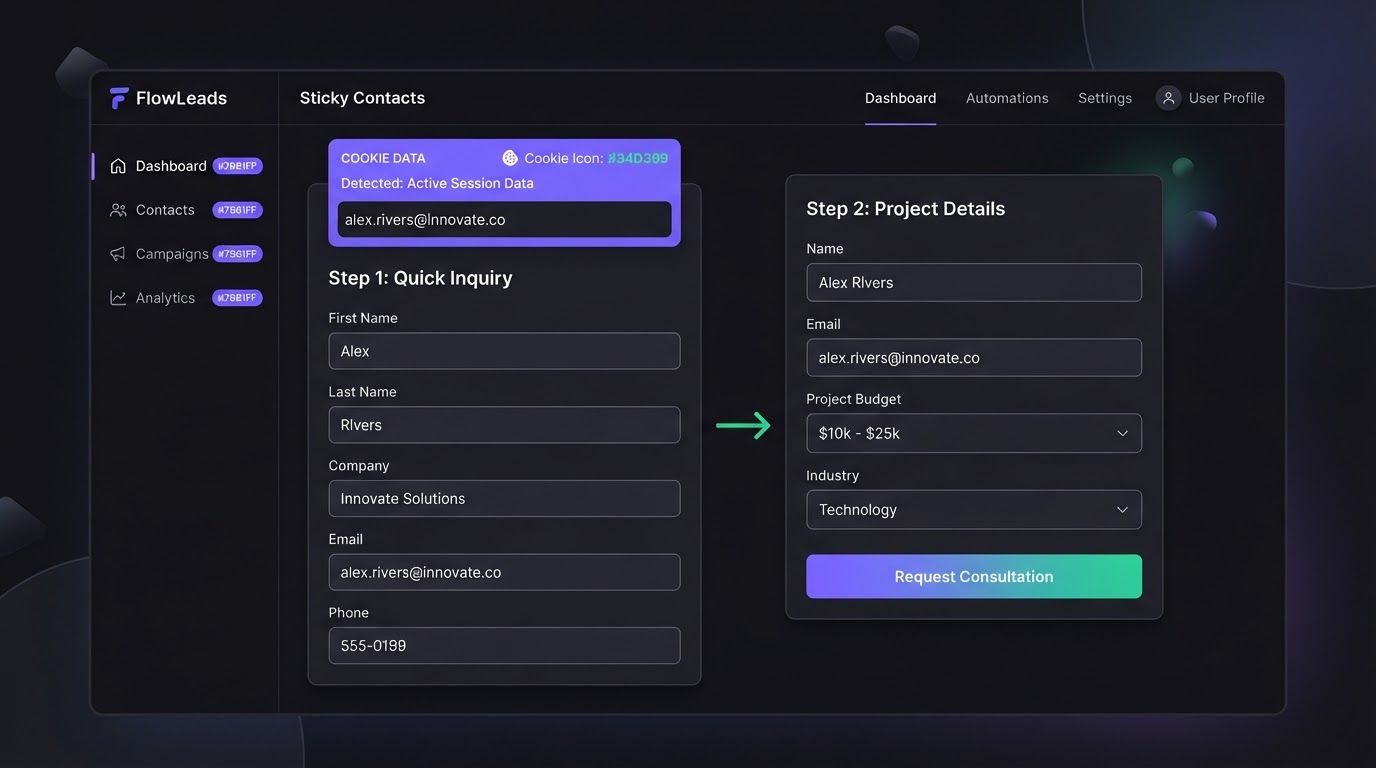
This feature uses browser cookies to remember a lead's information. If a prospect fills out a basic lead form and is redirected to a secondary calendar or order form, their name and contact info automatically pre-populate — drastically reducing friction and drop-off rates.
 Payments
Integrated Payments
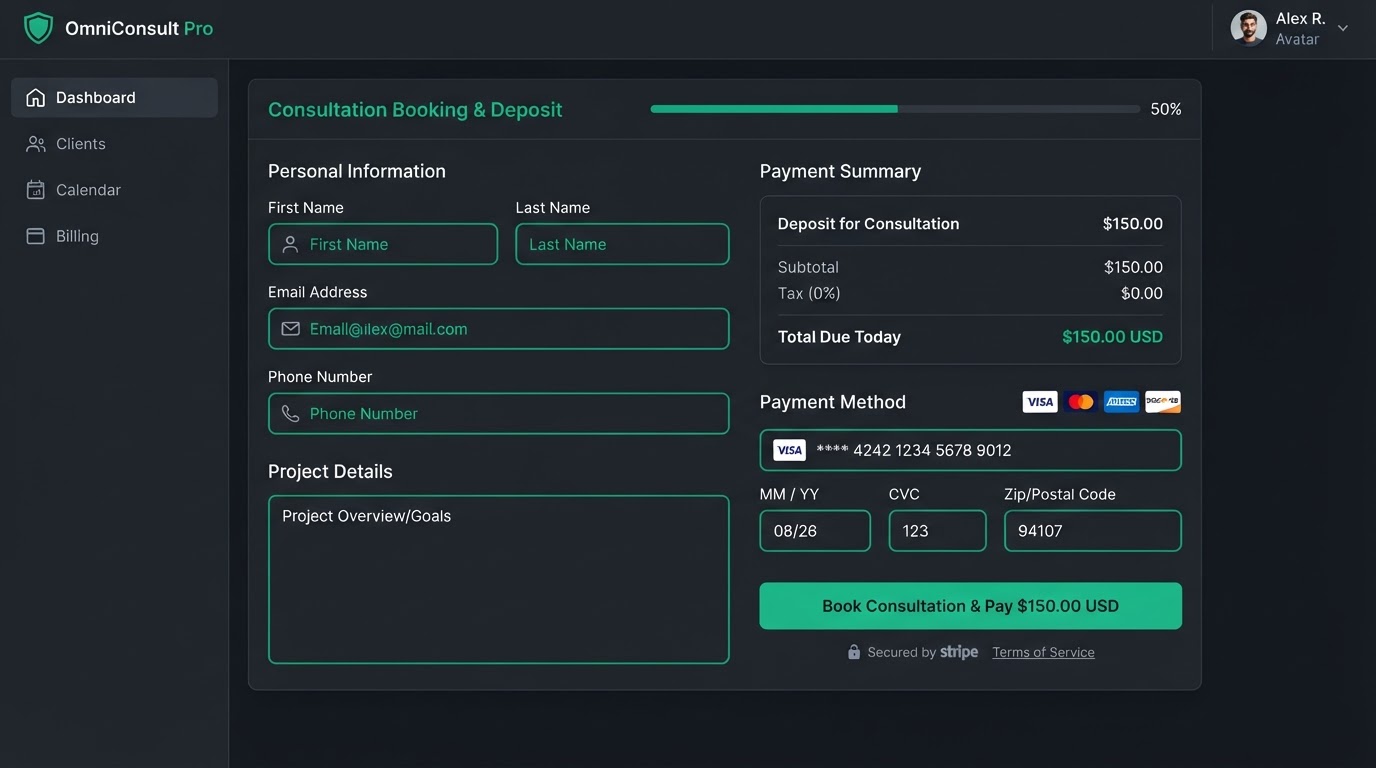
Forms can include payment elements connected to gateways like Stripe. Sell products, collect consultation deposits, or accept donations directly within the form — no separate e-commerce checkout page required.
 Embed
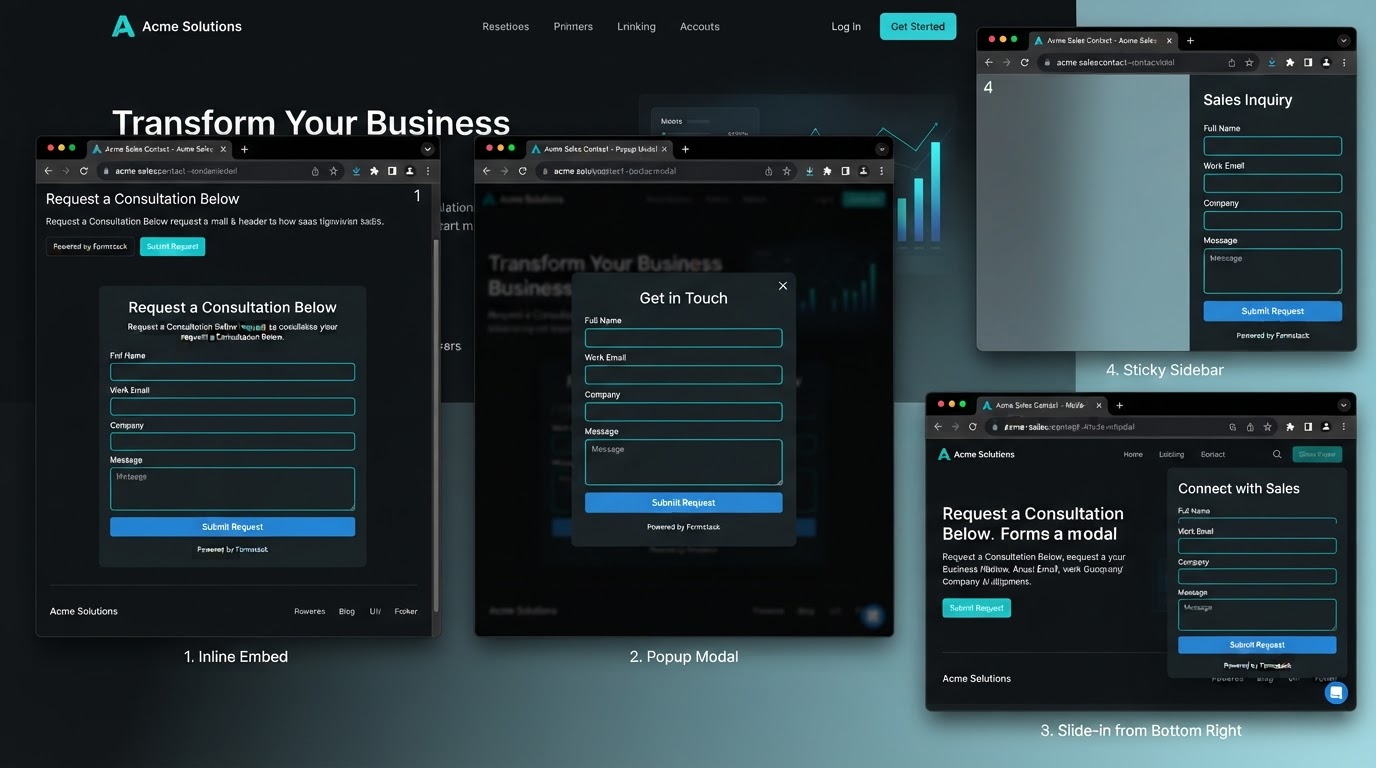
Embedding & Distribution
Forms drop seamlessly into your funnels and websites, but also provide specialized embed codes for external platforms like WordPress, Shopify, Squarespace, or Wix. Choose Standard inline, Popup modal, Polite Slide-In, or Sticky Sidebar — and trigger based on user behavior like a 5-second delay or 50% scroll.
 CRM Sync
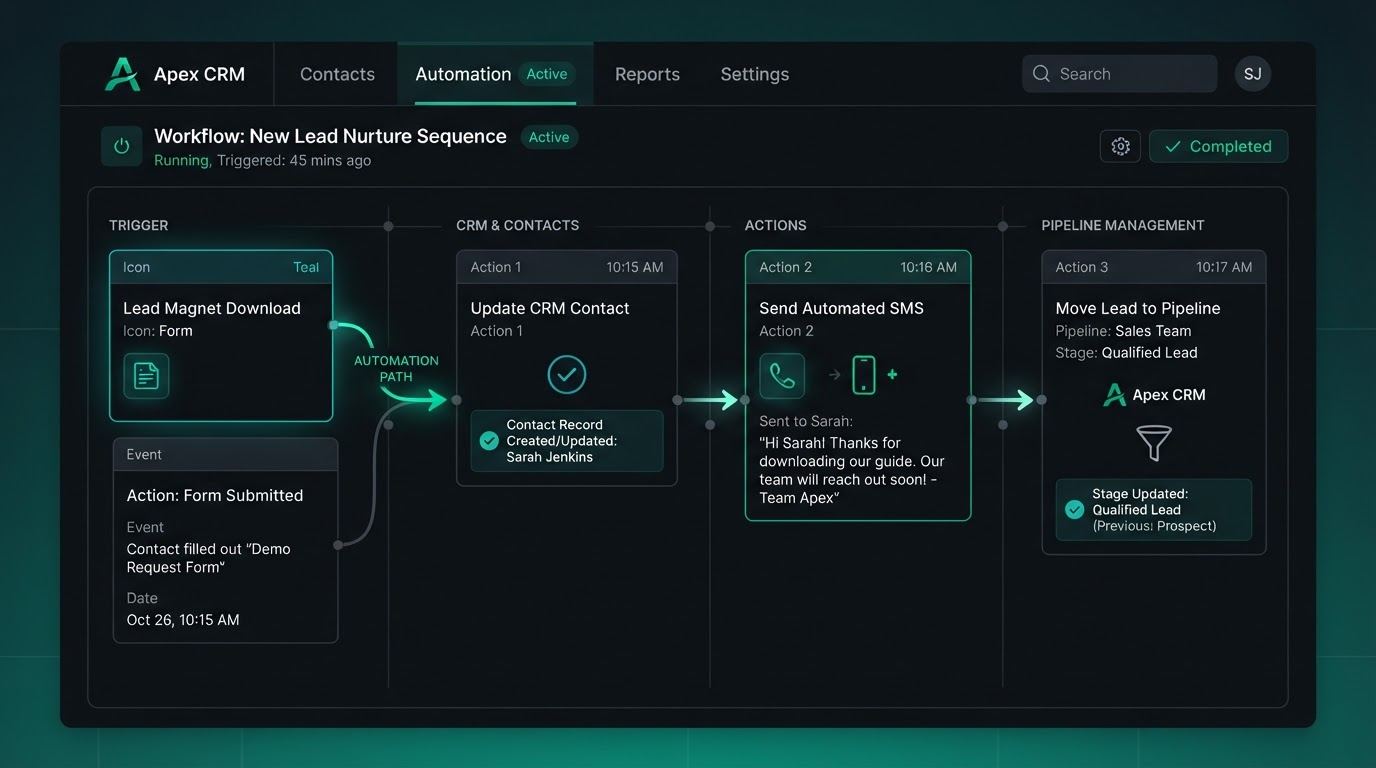
CRM Automation Advantage
Because forms live inside the CRM, you don't need bridging tools like Zapier. The moment a lead hits Submit, their profile is instantly created or updated in your Contacts tab — triggering Workflows to fire a welcome text, alert your sales team, and drop the lead's Opportunity card into a specific pipeline stage.
TURN EVERY FORM SUBMISSION INTO A BOOKED APPOINTMENT
Drop a booking calendar directly inside any form or survey. When a lead submits their info, your live availability appears instantly — they pick a slot, and the CRM handles the rest. No back-and-forth, no missed opportunities.
November 2026
Pick a time that works for you
Available — Nov 18
Sticky Contacts: Name, email & phone pre-filled from your form submission.
How It Works
Lead Fills The Form
A prospect completes your form with their details and service needs.
Calendar Appears
An embedded booking calendar slides in showing your real-time availability.
They Pick A Slot
The lead selects a time that works — Sticky Contacts pre-fills their info.
CRM Automates Everything
The appointment is booked, reminders fire, and the pipeline stage updates — instantly.
Everything That Happens Automatically
FROM QUESTION TO QUALIFIED LEAD
Build forms visually without code, guide prospects through smart conditional paths, and capture every submission directly into your CRM — every step native, no external tools.
Build Without Code
Drag, Drop, Publish — No Developer Needed
The visual, block-based form builder lets you construct professional lead-capture forms using customizable sections, rows, and elements — all without writing a single line of HTML, CSS, or JavaScript. Standard fields like Name, Email, and Phone are ready out of the box, alongside custom fields for any business-specific data you need to collect.
- Standard fields: Name, Email, Phone — ready instantly
- Custom fields: dropdowns, file uploads, e-signatures
- Flexible layouts: single column, side-by-side, or horizontal
- No code, no plugins, no developer required
Smart Conditional Paths
Multi-Step Surveys & Branching Logic
Instead of overwhelming a prospect with a massive single-page form, break questions into a multi-step survey. Apply conditional logic to show or hide specific fields — or route users down entirely different branching paths — based on how they answered a previous question. This is highly effective for pre-qualifying leads before they can book an appointment on your calendar.
- Break long forms into multi-step guided surveys
- Show or hide fields based on prior answers
- Route users down entirely different branching paths
- Pre-qualify leads before calendar booking
Instant CRM Sync
Every Submission Becomes a Contact
The fundamental advantage of native forms is their architecture. Because they live inside the CRM, you do not need bridging tools like Zapier to move the data. The moment a lead hits Submit, their profile is instantly created or updated in your Contacts tab. This can immediately trigger Workflows to fire a welcome text, alert your sales team, and drop the lead's Opportunity card into a specific pipeline stage — all in real time.
- Every submission instantly creates or updates a CRM contact
- Trigger automated Workflows on submit — no Zapier
- Fire welcome texts and sales alerts automatically
- Drop leads into the right pipeline stage instantly
REAL FORMS, REAL RESULTS
See how businesses across industries use native forms to capture leads, pre-qualify prospects, and collect payments — all flowing straight into their CRM.
Lead CaptureLead Magnet Funnel Form
A marketing agency deploys a lead capture form offering a free downloadable guide. The form collects name, email, and phone number. On submit, the lead's profile is instantly created in the CRM, a welcome email fires automatically, and their Opportunity card drops into the New Lead pipeline stage — all without a single manual step.
Appointment BookingPre-Qualification Survey Form
A dental practice uses a multi-step survey form with conditional logic to pre-qualify patients before booking. Based on their insurance type and treatment interest, the form routes them to the right calendar — and uses Sticky Contacts to pre-fill their details on the booking page, reducing drop-off by over 60%.
Paid ConsultationConsultation Deposit Form
A law firm collects a consultation deposit directly within their intake form using an integrated Stripe payment element. The form captures case details, collects payment, and creates the contact — all in one seamless flow. No separate checkout page, no manual payment reconciliation.
Replace all your form tools with one platform
Stop paying for separate form builders, survey tools, and payment integrations. Westcoast Forms consolidates your entire lead-capture workflow — at no extra cost.
Pick the software you're paying for today. We'll estimate your current monthly cost and show how Westcoast AI replaces it all — CRM, AI, and automation — with a plan sized for your team.
Select your current tools
0 selected · 302 platformsWestcoast AI
1 unified platform
CRM + AI + Automations included
Your Stack (est.)
$0/mo
0 tools
Est. Savings
$0/mo
$0/yr
Select the platforms you use today to see a feature-by-feature comparison with Westcoast AI.
MONTHLY PLANS
PRICING THAT FITS YOUR NEEDS AND BUDGET WITH ALL THE AUTOMATED AI INCLUDED
STARTER
- Basic
- 7-day free trial
- No setup fees
- 1 user
- AI & Automation
- AI Studio Web Builder
- Funnel Builder
- AI Voice Agent
- Text Message Conversation AI
- Creator Studio
- Mobile App Builder
- Basic AI Agents
- CRM
- Unlimited Contacts
- Opportunities & Pipeline Tracking
- Tasks
- Booking Calendars
- Marketing
- Social Media Planner & Automation
- Mass Email Campaigns
- Review & Reputation Management
- Social Media Ad Manager
- Affiliate Marketing Manager
GROWTH
- Basic
- 7-day free trial
- 20% off any advanced monthly AI services or lead generation
- No setup fees
- 3 users
- Snapshot Image For Your Industry Enabled
- AI & Automation
- AI Studio Web Builder
- Funnel Builder
- AI Voice Agent
- Text Message Conversation AI
- Creator Studio
- Mobile App Builder
- Auto Snapshot For Any Industry
- CRM
- Unlimited Contacts
- Opportunities & Pipeline Tracking
- Tasks
- Booking Calendars
- Unified Inbox (Email, SMS, Socials)
- Marketing
- Social Media Planner & Automation
- Mass Email Campaigns
- Review & Reputation Management
- Social Media Ad Manager
- Affiliate Marketing Manager
PREMIUM
- Basic
- 7-day free trial
- 30% off any advanced monthly AI services or lead generation
- No setup fees
- 10 users
- White-glove done-for-you custom setup
- API & Webhook Access
- AI & Automation
- AI Studio Web Builder
- Funnel Builder
- AI Voice Agent
- Text Message Conversation AI
- Creator Studio
- Mobile App Builder
- Auto Snapshot For Any Industry
- White-glove AI bot setup for voice and conversation done for you
- CRM
- Unlimited Contacts
- Opportunities & Pipeline Tracking
- Tasks
- Booking Calendars
- Unified Inbox (Email, SMS, Socials)
- Marketing
- Social Media Planner & Automation
- Mass Email Campaigns
- Review & Reputation Management
- Social Media Ad Manager
- Affiliate Marketing Manager
ENTERPRISE
- Basic
- No setup fees
- 40% off AI Leads and services
- 11 or more users
- White-glove done-for-you custom setup
- API & Webhook Access
- All Enterprise and custom solutions
- AI & Automation
- AI Studio Web Builder
- Funnel Builder
- AI Voice Agent
- Text Message Conversation AI
- Creator Studio
- Mobile App Builder
- Auto Snapshot For Any Industry
- White-glove AI bot setup for voice and conversation done for you
- CRM
- Unlimited Contacts
- Opportunities & Pipeline Tracking
- Tasks
- Booking Calendars
- Unified Inbox (Email, SMS, Socials)
- Marketing
- Social Media Planner & Automation
- Mass Email Campaigns
- Review & Reputation Management
- Social Media Ad Manager
- Affiliate Marketing Manager
FORMS QUESTIONS
Forms (and their advanced counterpart, Surveys) are native lead-capture and data-collection tools built directly into the CRM. They replace standalone third-party software like Jotform, Typeform, or Gravity Forms by ensuring all captured data flows immediately into your contact database and automation engine — no Zapier or external bridging required.
No. The drag-and-drop builder lets you visually construct forms using standard fields (Name, Email, Phone) and custom fields (dropdowns, file uploads, e-signatures) without writing any code. You can arrange fields in a single column, side-by-side, or a streamlined horizontal single-line design.
Conditional logic lets you show or hide specific fields — or route users down entirely different branching paths — based on how they answered a previous question. Combined with multi-step surveys, this is highly effective for pre-qualifying leads before they can book an appointment on your calendar, ensuring only qualified prospects reach your team.
Sticky Contacts uses browser cookies to remember a lead's information. If a prospect fills out a basic lead form and is redirected to a secondary calendar or order form, their name and contact info automatically pre-populate — drastically reducing friction and drop-off rates across multi-step funnels.
Yes. Forms can include payment elements connected to gateways like Stripe. This allows you to sell products, collect consultation deposits, or accept donations directly within the form — without needing to build a separate e-commerce checkout page.
Yes. Forms can be dropped into your funnels and websites natively, but they also provide specialized embed codes for external platforms like WordPress, Shopify, Squarespace, or Wix. You can choose Standard inline, Popup modal, Polite Slide-In, or Sticky Sidebar — and configure triggers based on user behavior like a 5-second delay or 50% scroll depth.
Because forms live inside the CRM, you don't need bridging tools like Zapier. The moment a lead hits Submit, their profile is instantly created or updated in your Contacts tab. This can immediately trigger Workflows to fire a welcome text message, alert your sales team, and drop the lead's Opportunity card into a specific sales pipeline stage — all in real time.
See your business built in minutes.
Book a live walkthrough of the Westcoast AI Studio. Tell us what you sell and watch us generate a complete, niche-matched website on the spot — copy, imagery, layout, and CRM integration included.

Book your demo
Tell us about your project — we'll build it live.